
Let’s see how to reshape array in NumPy using the np.reshape() method, which changes array dimensions while preserving total elements and supports order and copy parameters.
How to Reshape Arrays in NumPy
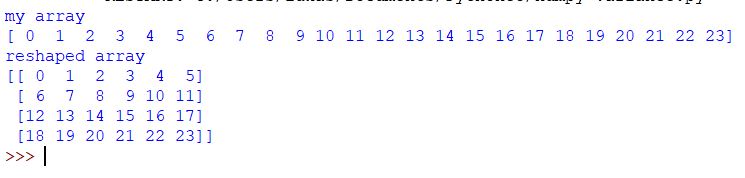
Suppose you would like to reshape a one-dimensional array into a two-dimensional one with four rows and six columns.
import numpy as np

my_array = np.arange(24)

reshaped_array = my_array.reshape(4, 6)
print("my array")
print(my_array)
print("reshaped array")
print(reshaped_array)
It’s crucial to ensure that the total number of elements remains consistent before and after reshaping. In this example, the original array my_array has 24 elements (from 0 to 23), and the reshaped array reshaped_array also contains 24 elements (4 rows * 6 columns = 24). Attempting to reshape to dimensions that do not maintain the total element count will result in a ValueError.
In other words, the first argument will be the number of rows and the second one will be the number of columns.
The np.reshape() method reshapes array in NumPy from 1D to 2D or higher dimensions without changing data, using row-major (‘C’) or column-major (‘F’) order for element arrangement. The first argument specifies the number of rows, and the second specifies the number of columns.
Additional Parameters of the reshape Method
order: This parameter controls the order in which elements are read from the original array and placed into the reshaped array. It accepts two primary values:'C'(default): Specifies row-major (C-style) order. This means reshaping is performed row by row. Elements are read and filled along each row before moving to the next row. This is the default behavior in NumPy and is similar to how arrays are laid out in memory in C and Python.'F': Specifies column-major (Fortran-style) order. Reshaping is done column by column. Elements are read and filled down each column before moving to the next column. This order is used in languages like Fortran.
copy(optional, default:False): This boolean parameter determines whether the reshape operation returns a view or a copy of the original array.copy=True: Forces the method to return a copy of the array. This guarantees that the reshaped array is a new array in memory, and modifications to it will not affect the original array.copy=False(default): Whenever possible, reshape will return a *view* of the original array. A view means that the reshaped array shares the same data buffer as the original array. Changes to the view will affect the original array, and vice versa. NumPy attempts to return a view whenever it’s memory-efficient to do so.