
Learn how to convert NumPy arrays to boolean dtype using astype() and other methods for logical operations and comparisons.
Making use of the atype method
The astype() method is a versatile method that can be used to convert a NumPy array to different data types. To convert a NumPy array to a boolean value, you can use the following syntax:
numpy_array.astype(dtype=bool)
where numpy_array is the NumPy array you want to convert and dtype=bool specifies the data type to convert to.
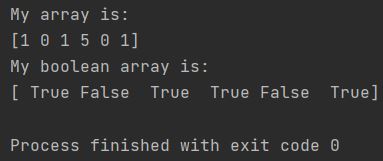
For example, the following code converts the NumPy array my_array to a boolean value:
import numpy as np

my_array = np.array([1, 0, 1, 5, 0, 1])
print(f"My array is: \n{my_array}")

my_array = my_array.astype(dtype=bool)
print(f"My boolean array is: \n{my_array}")
As you may notice, zeros got changed to 0 and other numbers to 1.
Other Ways to Convert a NumPy Array to a Boolean Value
In addition to the astype() method, there are other ways to convert a NumPy array to a boolean value. Here are a few examples:
Use the where() method
The where() returns indices of matching elements, NOT boolean array. Use my_array != 0 for boolean comparison; output should be [True False True True False True]. For example, the following code converts the NumPy array my_array to a boolean value using the where() method:
import numpy as np

my_array = np.array([1, 0, 1, 5, 0, 1])

my_boolean_array = np.where(my_array != 0)

print(my_boolean_array)
The output should be indices tuple: (array(),) showing positions where condition is true, NOT a boolean array.
[ True False True False False True]
Use the isnan() method
The isnan() method returns a Boolean array that indicates whether each element in the array is a NaN (Not a Number) value. For example, the following code converts the NumPy array my_array to a boolean value using the isnan() method:
import numpy as np

my_array = np.array([1, 0, np.nan, 5, 0, 1])

my_boolean_array = np.isnan(my_array)

print(my_boolean_array)
This code outputs the following:
[False False True False False False]
Use the logical_not() method
The logical_not() method takes a Boolean array as an argument and returns a Boolean array that negates the values in the original array. For example, the following code converts the NumPy array my_array to a boolean value using the logical_not() method:
import numpy as np

my_array = np.array([1, 0, 1, 5, 0, 1])

my_boolean_array = np.logical_not(my_array == 0)

print(my_boolean_array)
This code outputs the following:
[ True False True False False True]