
Let’s embark on an exciting journey to learn how to draw different Python pyramid patterns, including numeric, hashed, hollow, inverted and letter pyramids.
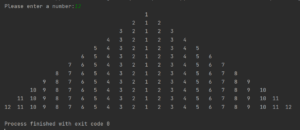
Drawing a Numeric Pyramid
To start, we’ll write a Python script that prompts the user to enter a number. Based on the provided number, the script will draw a pyramid of that size.

UserNumber = eval(input("Please enter a number:"))

for i in range(1, UserNumber + 1):
    for j in range(UserNumber - i, 0, -1):
        print(" ", end="\t")

    for k in range(i, 1, -1):
        print(k, end="\t")

    for l in range(1, i + 1):
        print(l, end="\t")
    print(" ")
This script uses nested loops to print spaces and incrementing numbers up to the user-specified number, creating a pyramid shape.
Creating a Hashed Pyramid
Now, let’s explore another Python pyramid example, this time using hashes instead of numbers.
size = int(input("Enter number: "))

for number in range(1, size + 1):

    for i in range(size - number):
        print(' ', end='')
    for j in range(2 * number - 1):
        print('#', end='')
    print()
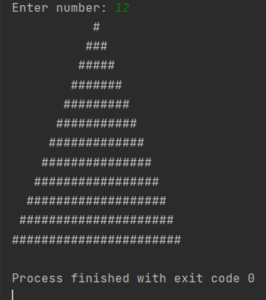
This pyramid will be taller and thinner, constructed using hash symbols.
Crafting an Upside-Down Pyramid
In a similar fashion, we can create an upside-down pyramid.
size = int(input("Enter number:"))

for i in range(0, size):

    for j in range(i + 1):
        print(' ', end='')

    for x in range(size - 2 * i):
        print('#', end='')
    print()
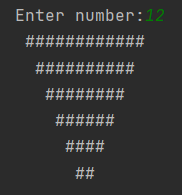
Constructing a Digits Pyramid
Next, we’ll construct a pyramid using digits, where each level’s number squares as we ascend the pyramid.
import math

x = 10
y = 0
for i in range(x):
    a = x - i
    y += pow(10, i)
    for j in range(a):
        print(' ', end='')
    print(pow(y, 2))
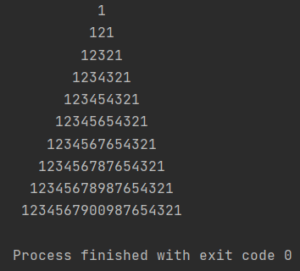
Designing a Letter Pyramid
Lastly, let’s create a pyramid using letters:
number = int(input('Enter the number:'))
for i in range(number):
    n = ' ' * (number - i)
    for j in range((2 * i + 1) // 2):
        n += chr(65 + i - j)
    for j in range((2 * i + 1) // 2, 2 * i + 1):
        n += chr(65 + j - i)
    print(n)
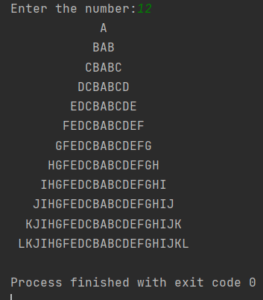
Now that you can print several pyramid patterns in Python, you can experiment with new variations and custom symbols to deepen your understanding of nested loops and console pattern design.
Hollow Pyramid
Enhance your Python pyramid by crafting a hollow version. This design leaves the center of the pyramid empty, creating an exciting geometric pattern. Here’s a Python script to get you started:
size = int(input("Enter a number: "))

for i in range(1, size + 1):
    for j in range(size - i):
        print(' ', end='')
    for j in range(2 * i - 1):
        if j == 0 or j == 2 * i - 2 or i == size:
            print('#', end='')
        else:
            print(' ', end='')
    print()
Pyramid of Symbols
Explore the world of symbols by designing a pyramid with your favorite characters. You can choose any character or symbol to construct your unique pyramid. Here’s an example using asterisks:
size = int(input("Enter a number: "))

for i in range(1, size + 1):
    for j in range(size - i):
        print(' ', end='')
    for j in range(2 * i - 1):
        print('*', end='')
    print()
Inverted Hollow Pyramid
Reverse the direction of your hollow pyramid, creating a unique inverted pattern. Here’s how you can achieve it:
size = int(input("Enter a number: "))

for i in range(size, 0, -1):
    for j in range(size - i):
        print(' ', end='')
    for j in range(2 * i - 1):
        if j == 0 or j == 2 * i - 2 or i == size:
            print('#', end='')
        else:
            print(' ', end='')
    print()
Feel free to explore these variations and experiment with different symbols, patterns, and directions to create captivating Python pyramids.