
Let’s see how to generate sequence arrays in NumPy using the np.arange() function, which creates evenly spaced values with customizable start, stop, and step parameters.
Sequence arrays are a type of Numpy array that can be used to store evenly spaced values. They are often used to represent data such as time series, temperature readings, and stock prices.
Using an arange method
NumPy’s np.arange(start, stop, step) is perfect for generating sequence arrays in NumPy, supporting positive/negative steps and floating-point increments for time series or data ranges. The syntax for the arange function is as follows:
numpy.arange(start, stop, step)
The start argument specifies the starting value of the sequence, stop specifies the ending value, and step defines the increment between each value in the sequence.
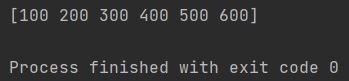
For example, the following code generates a sequence array of numbers from 100 to 700 with a step size of 100:
import numpy as np

sequence_array = np.arange(start=100, stop=700, step=100)
print(sequence_array)
As you can see the only thing is to set start, stop and step. Numpy arange does the rest.
Generating Sequence Arrays with Different Step Sizes
Negative step sizes can be used with arange to generate sequence arrays in reverse order, from a higher starting value to a lower ending value.
For example, the following code generates a sequence array of numbers from 100 to 1 with a step size of -2:
import numpy as np

sequence_array = np.arange(100, 1, -2)
print(sequence_array)
The following code generates a sequence array of numbers from 1 to 0 with a step size of -0.1:
import numpy as np

sequence_array = np.arange(1, 0, -0.1)
print(sequence_array)
The arange function is a versatile tool that can be used to generate sequence arrays of different types. It is a valuable function for any Python programmer who needs to work with sequence data.
To further expand your knowledge, consider exploring:
- The
numpy.linspacefunction. - Python’s built-in
range()function. - The
dtypeparameter ofarange.