
Let’s explore how to sum an array using the NumPy Python library.
How to Sum up Array Elements in Numpy
There is Numpy built-in function which will help you to sum up array elements.
import numpy as np

my_array = np.array([1, 56, 55, 15, 0])

array_sum = np.sum(my_array)

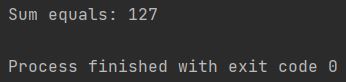
print(f"Sum equals: {array_sum}")
The NumPy sum function totals all elements in the array and returns the result.
The numpy.sum function can be applied to arrays of various data types, including integers, floating-point numbers, and booleans (where True is treated as 1 and False as 0). The resulting sum will have a data type that accommodates the accumulated values, preventing potential overflow issues in many cases.
To calculate the sum of an array in NumPy, simply follow these steps:
- Import the numpy library.
- Create a Numpy array.
- Apply the sum() function to the array.
- Output the sum.
Beyond summing all elements, numpy.sum() offers flexibility through optional parameters. The axis parameter, for instance, allows you to sum elements along a specific axis in multi-dimensional arrays. For a 2D array, axis=0 would sum elements column-wise (resulting in a sum for each column), and axis=1 would sum elements row-wise (resulting in a sum for each row). Other parameters like dtype, out, and keepdims offer further control over the summation process and output.
When called without optional parameters, as shown in the initial example, numpy.sum() defaults to summing all elements of the input array, regardless of its shape or dimensions.